

Across a sample of a thousand support teams, the average ticket takes more than three days to close from start to finish. That number surprises most people, since the actual fix, once someone is looking at the right screen, usually takes minutes.
The gap between those two numbers is where remote IT support software earns its keep, by cutting out the travel, scheduling, and back and forth that turn a five minute fix into a multi day ordeal. Here is exactly where that time goes, and how remote access closes the gap, without asking support teams to compromise on the security practices that matter just as much as speed.
Key Takeaways
- The average ticket resolution time across support teams sits around 82 hours, according to an analysis of roughly 1,000 companies, far longer than the actual fix usually requires.
- Most of that time is lost to waiting, scheduling, and travel rather than the technical work itself.
- Remote access removes physical travel entirely and lets a technician begin diagnosis the moment a ticket is opened, rather than after a scheduled visit.
- Security controls, session logging, permission scoping, patch management, matter just as much once resolution speed increases, since faster does not mean less careful.
- Teams that measure where time is actually lost tend to see the biggest gains from adopting remote tools.
Why Ticket Resolution Time Is the Metric That Matters Most
Resolution time is the clearest signal of whether a support operation is actually working, more revealing than ticket volume or even customer satisfaction scores on their own. A team can close plenty of tickets and still leave users waiting days for anything that requires real troubleshooting, which is exactly the gap that erodes trust in an IT department over time.
Reliable remote IT support software for technicians shrinks that number by removing the parts of a support ticket that have nothing to do with the actual technical problem. Once a technician can see the affected device immediately, the clock on resolution time starts working in the support team’s favor rather than against it.
Where the Time Actually Goes in a Typical Ticket
Understanding the breakdown matters more than the headline number, since it shows exactly where the opportunity to improve sits, rather than leaving a team to guess at which stage of the process is actually costing the most time.
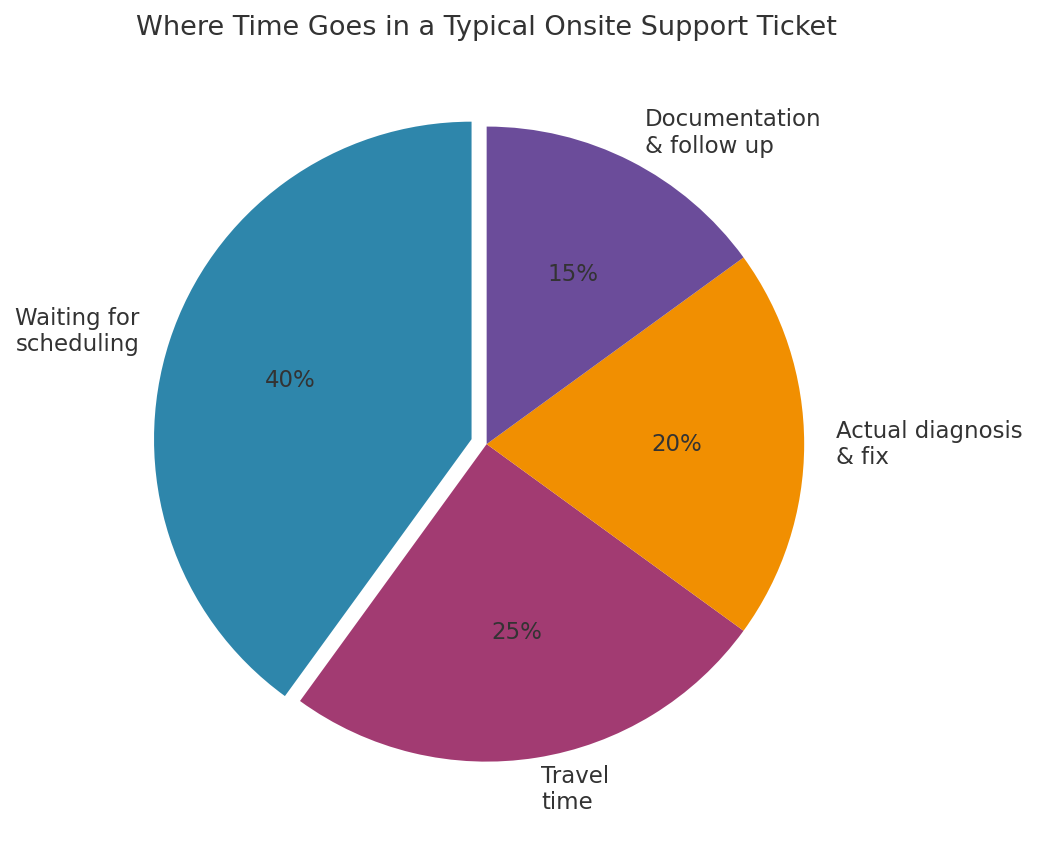
Chart: Breakdown of time consumed by stage in a typical onsite support ticket.
Scheduling delays and travel time together account for the majority of total resolution time in tickets that require someone to physically visit a device. The actual technical work, the part everyone assumes is the bottleneck, is usually the smallest slice of the pie.
How Remote Access Removes the Biggest Delays
Two specific changes explain most of the improvement teams see after adopting remote tools.
Eliminating Travel and Wait Time
A technician who can connect to a device immediately skips the scheduling conversation entirely. There is no drive across a building or across town, no coordinating a convenient time, and no dead time between when a ticket is opened and when someone starts looking at it. That single change routinely removes more time from a ticket than every other improvement combined.
Faster, More Accurate Diagnosis
Seeing the actual screen, rather than relying on a user’s description over the phone, cuts out a huge amount of guesswork. Misdiagnosis based on a vague description is one of the most common reasons a ticket gets reopened, which adds an entirely new resolution cycle on top of the first one. A technician who can see the exact error message, the exact settings panel, or the exact behaviour in question rarely needs to ask a user to describe anything twice.
Resolution Time Comparison: Remote vs Onsite Support
The difference between these two approaches shows up clearly once time is actually tracked by category.
|
Stage |
Onsite Support |
Remote Support |
|
Time to first contact |
Hours to days, pending scheduling |
Minutes, often immediate |
|
Diagnosis |
Based on description, then confirmed on arrival |
Direct, real time screen access |
|
Fix time |
Similar once technician is present |
Similar once connection is established |
|
Follow up visits |
Common if parts or tools are missing |
Rare, since most fixes are software based |
Software issues, which make up the majority of support tickets in most organisations, are exactly the category where remote access closes almost the entire time gap.
The Security Side of Faster Fixes
Speed only helps if it does not come at the cost of proper security practices.
|
Key Principle: Faster resolution should never mean skipped verification. Every remote session should still require authentication, and every fix involving a software update should follow the same patch management discipline as a scheduled maintenance window. |
A meaningful share of support tickets trace back to unpatched software, which is why understanding
How vulnerability management programs work matters even for teams focused primarily on speed. Reviewing the layered approach behind
Comprehensive network security defenses helps clarify why remote support tools need to sit inside a broader security strategy rather than operating as an unmonitored side channel into company devices. The same thinking behind
Protecting critical network assets from privilege escalation applies to a remote support account too, since a compromised technician login can move through a network in ways a compromised standard user account often cannot.
The Real Cost of Slow Resolution
Slow resolution is not just an inconvenience, it carries a real, measurable cost.
“The average customer support ticket resolution time is 3 days 10 hours, or roughly 82 hours, based on an analysis of support data from around 1,000 companies.”
That gap between a technical fix that takes minutes and a resolution process that takes days represents lost productivity for every person waiting on that ticket. Looking closer at
Real world ticket resolution benchmarks across industries shows just how much variation exists between teams that have adopted remote tools broadly and those still relying primarily on scheduled onsite visits. Understanding
How remote support software reduces downtime and costs ties this efficiency gain directly to a dollar figure that finance teams tend to find far more persuasive than a percentage improvement in a KPI dashboard.
Common Mistakes That Slow Down Remote Resolution
Even with the right tools in place, a few habits routinely undercut the time savings remote access should provide.
|
Warning: Never skip identity verification to save time on a support call. A rushed verification step that turns out to be a mistake costs far more time than the few seconds it would have taken to confirm properly. |
- Failing to grant technicians the specific permissions needed before a session starts, causing mid session delays
- Relying on generic troubleshooting scripts instead of actually looking at the screen first
- Not logging what was changed, which slows down any ticket that gets reopened later
- Treating every ticket the same way instead of triaging by likely resolution path
Reviewing
Role based access management practices help prevent one of the more common mid session delays, where a technician has to pause a fix to request additional permissions that should have been granted at the start of the ticket. The same discipline applies at a smaller scale here too, since a remote support session touching a sensitive system deserves the same scrutiny as any other privileged access request, even when the goal is speed rather than a formal audit.
FAQs
What counts as ticket resolution time?
Resolution time is typically measured from the moment a ticket is opened to the moment it is fully closed, including any wait time, diagnosis, the actual fix, and confirmation that the issue will not recur. Teams that only track the fix itself tend to underestimate how much total time a ticket actually consumes.
Does remote support work for every type of IT ticket?
No. Hardware failures and physical repairs still require someone on site, but the majority of everyday tickets, software issues, configuration problems, account access, are well suited to remote resolution, since nothing about them requires physical hands on the machine.
How much faster is remote resolution compared to onsite support?
The exact improvement varies by organisation, but eliminating scheduling delays and travel time alone typically removes the largest single chunk of total resolution time for software related issues, often more than the technical fix itself ever consumed.
Does faster resolution increase security risk?
Not inherently, provided the same authentication and logging standards apply to every session regardless of speed. Rushing past those standards, rather than the speed itself, is what introduces risk, and the two are easy to keep separate with the right process in place.
How can a support team start measuring where their time actually goes?
Break resolution time into categories, wait time, diagnosis, fix, and documentation, rather than tracking only the overall average, since the breakdown reveals which stage is worth targeting first and prevents effort from going toward the part of the process that was never really the problem.
Conclusion
The gap between how long a fix actually takes and how long a ticket stays open is where most support teams have the most room to improve. Remote IT support software closes that gap by removing travel and scheduling delays entirely and letting diagnosis start the moment a ticket lands, without asking technicians to cut corners on security to get there. Teams that track resolution time by category, rather than as a single average, tend to find the opportunity is bigger than they expected, and often bigger than any single technician improvement could have delivered on its own.
References
Jitbit, Average Customer Support Metrics From 1000 Companies — https://www.jitbit.com/news/2266-average-customer-support-metrics-from-1000-companies/
Fortinet, What Is Vulnerability Management? A Complete Guide — https://www.fortinet.com/resources/cyberglossary/vulnerability-management
Fact Check: All statistics and data points in this article were verified against original sources as of 20 August 2026. Sources are listed in the References section.